
Menu:
Updates:
December 2015:
Morpheus App gets a brand new UI/p>
March 2015:
Morpheus App published
Feb 2011:
WindyCalcPro App published
June 2010:
WindyCalc App published
Morpheus
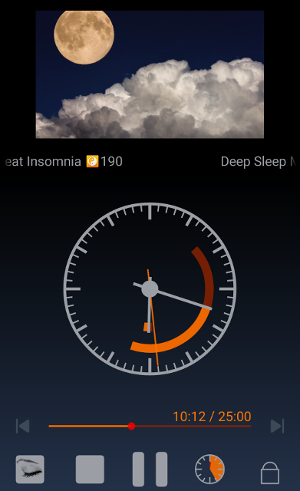

Morpheus
is
the most complete App to play any kind of music to relax and fall asleep.
Choose some sound or music ...
Listen… relax… sleep…
Morpheus
offers many options to
guarantee you a natural and restorative night‘s sleep.
It plays for the chosen duration and gently decreases the volume
according to your choice.
When the music, or the sound loop, ends, Morpheus can automatically switch off devices and sounds, according to your preferences:
- Bluetooth
- Wifi
- Sounds & notifications:
- Alarm
- Phone ring
- Notifications (email, messages)
- System sounds (don't like to get awaken because of low battery ? Neither do I...)
- Lock your device automatically.
Play any of the following media:
- Sounds (loop)
- Music files (your mp3 collection...)
- Internet radio
-

Download and try it right now.
It's free:
Let me know here what you like, you don t like or would like to see in future versions !
Media typesMorpheus can play any of the following media types:
A few free sounds. Sounds are played in a loop. A few free sample relaxing tracks or extracts from ForceMajeure.com Play one or more (queue) of your own music files (mp3,...) from the SdCard. When you choose a music, you may add it to the current play list or start a new list. In a future version you will be able to edit and store your playing lists. Stay tuned! A choice of five relaxing and sleeping music internet
radio channels. There
are many relaxing, meditation, sleeping... musics and sounds
compilations available on Youtube. When
installing Morpheus,
it comes with an arbitrarily chosen set of youtube video's, and a few
standard search words (sleep, medittion, relaxing...) that immediately
and conveniently redirects you into the YouTube
App with a result list to choose from. Chose a video and share it towards the Morpheus
application. Easy. |

Volume decreaseThe three volume curves available define how the volume automatically decreases while playing:
Indicated volume 4/7: 4 is the current volume; 7 is the media volume set on your device, when the play did start. Note that Morpheus checks your device to make best use of ALL available volume levels! Instead of setting this from the preferences, you may simply switch to the next curve type by clicking on the small volume graph at the bottom of the volume bar. |
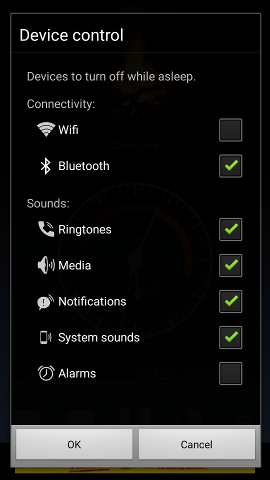
Device controlWhen the chosen playing time is over, Morpheus automatically
switches devices oand sounds of according to your choices:
You may for example switch the bluetooth and wifi off, and only keep the alarm sound switched on. Or keep the ringtones on but avoid the SMS and Mails notifications sounds. You choose! |
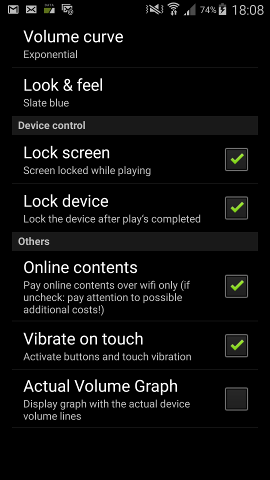
PreferencesFurther preferences available:
|
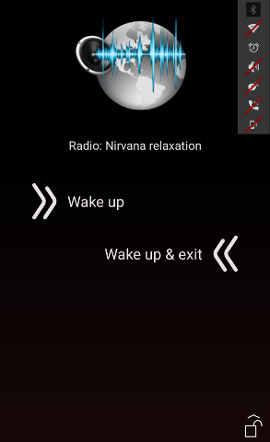
Wake up!Time to wake up... Simply slide 'Wake up' to restore you device to the initial state (volumes, wifi, bluetooth...) ! 'Wake up & exit' will do the same, but immediately exit the Morpheus application after restoring you device sate. In a future version, Morpheus will be able to wake up your device automaticcally at a given time (wake up at 06:30am), or after a choosen sleeping time (say you always want at least 7 hours undisturb sleeping time). |
|
Coming soon !Morpheus is a pretty new application with many playing functionalities and a rich palette of options. That requires work... enjoyable work.... but time ! What's next:
|